5 guides in the Akko hub
ISO vs ANSI Keyboard: What Changes on UK and EU Boards
ISO keyboards add one key and a tall, stepped Enter. That is the physical gap in the ISO vs ANSI keyboard choice: ANSI, the American standard, uses a wide single-row Enter and a long left Shift, while ISO, used across the UK and most of Europe, shortens the left Shift to fit an extra key and stretches Enter over two rows.
Neither shape makes you type faster, so choose by the language you write and the legends printed on the caps. If you type German, French, Swedish or British English with a £ sign, buy ISO in your national layout. If you write English or code on a US setup, ANSI gets you the far bigger keycap aftermarket. The mistake that costs real money is buying keycaps for the wrong one.
Disclosure: links to akkogear.eu are affiliate links. If you buy through them, we earn a commission from Akko at no extra cost to you.
ISO vs ANSI Keyboard Layout: One Extra Key, Three Changed Shapes
An ISO board differs from an ANSI board in four places, all at the edges of the letter block. The letters, number row, space bar and arrow keys are the same size on both, which is why a photo of either one looks almost identical until you check the right-hand side.
- Enter. ANSI Enter is one row tall and about 2.25 units wide. ISO Enter is two rows tall, about 1.5 units wide at the top and narrower at the bottom, shaped like an upside-down L.
- The key above Enter. ANSI puts a 1.5-unit backslash key there. ISO gives that space to the taller Enter and tucks a 1-unit key into the notch beside its lower half, carrying # and ~ on a UK board.
- Left Shift. ANSI's is about 2.25 units wide. ISO's is about 1.25 units, followed by an extra 1-unit key: \ and | on a UK board, < > | on German and French boards.
- Right Alt. Same size on both, but ISO national layouts use it as AltGr, the modifier for €, many accented letters and, on German boards, the brackets.
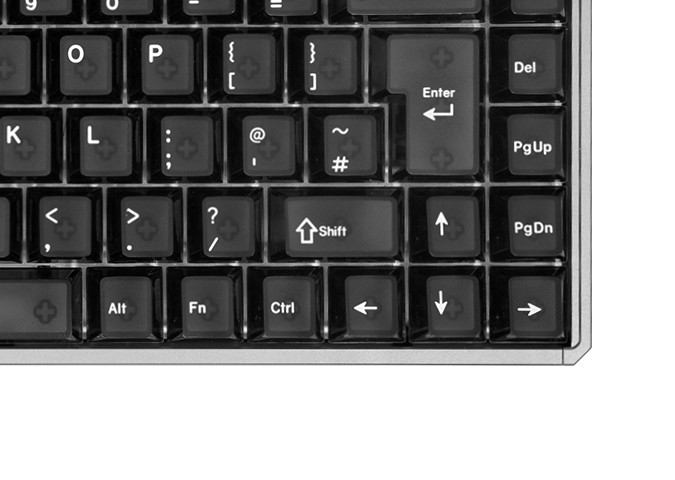
Your hands notice two of those changes within minutes. A right pinky trained on ANSI reaches up and to the right for Enter and finds the ISO Enter's narrower bottom half, and a left pinky trained on ANSI reaches for Shift and lands on the extra key beside it. The shapes stop mattering after a few days of use; the misfires during those days are the whole switching cost.
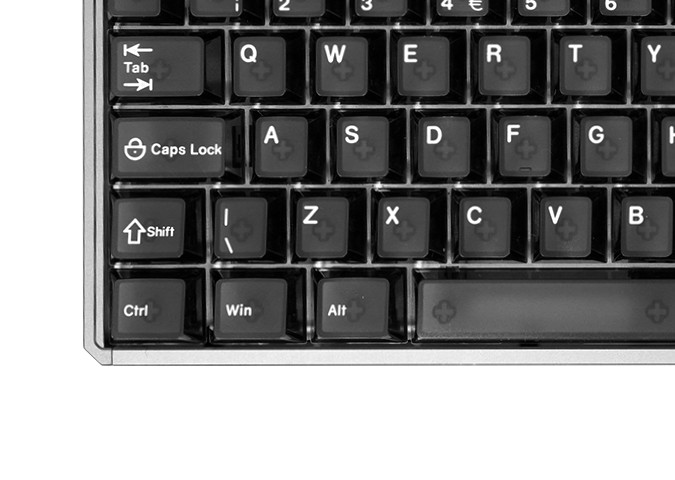
None of this limits which kind of keyboard you can buy. Akko's hall effect keyboards in ISO layouts include ISO-DE, ISO-FR and ISO-UK versions of the MOD68 HE, each listed with 0.1 to 3.3 mm adjustable actuation, rapid trigger and 8 kHz wired polling, so a European buyer does not have to settle for an ANSI board, or a sticker kit, to get magnetic switches.
How Many Keys Does an ISO Keyboard Have?
An ISO keyboard has one more key than the ANSI version of the same size: 105 against 104 on a full-size board, 88 against 87 on a tenkeyless, and 69 against 68 on the popular 65% layout with arrow keys.
| Board size | ANSI keys | ISO keys |
|---|---|---|
| Full-size (with number pad) | 104 | 105 |
| Tenkeyless (no number pad) | 87 | 88 |
| 65% (arrows, no function row) | 68 | 69 |
| 60% (no arrows) | 61 | 62 |
Shop listings do not always agree with this table. Akko's own German-store layout guide files 68 and 69 keys under a "60% layout" heading, but 68 keys is a 65% board; a 60% ANSI board has 61.
The MOD68 HE ISO listings repeat the "68-Key" keycap wording from the US model. Counting the keys on Akko's own ISO-UK product photo gives 69, row by row, with the \ key beside the short left Shift as the extra one. When you order spare keycaps or a set for an ISO board, go by the layout name, not the number in the product title.
ISO-UK, ISO-DE, ISO-FR and Nordic: What the Legends Change
ISO fixes the key shapes only. The characters printed on them come from the national layout, so an ISO-UK, an ISO-DE and an ISO-FR board can share one physical frame and still type three different sets of symbols.
ISO-UK
The ISO UK keyboard follows British Standard BS 4822, and Wikipedia's comparison of British and American keyboards lists what moves against the US layout. £ takes Shift+3, where US boards put #. The @ and " swap places, so @ becomes Shift+' and " becomes Shift+2. The # and ~ get their own key in the Enter notch, and \ moves to the left of Z.
Plug a UK board into a computer still set to US English and Shift+2 gives @ while the keycap says ". That is a software setting, not a faulty keyboard: change the input language to English (UK) and every legend lines up. For British readers the practical choice is narrow. English needs no accents, so plenty of UK programmers run ANSI with a US layout; if you type £ daily or share a desk with other UK machines, ISO-UK keeps every key where your office laptop has it.
ISO-DE (QWERTZ)
German boards swap Z and Y, give Ü, Ö and Ä the bracket and semicolon positions, put ß beside 0, and use the extra key by left Shift for < > |. The brackets move behind AltGr: the FUN68 ISO-DE's keycaps print { [ ] } as second legends on 7, 8, 9 and 0. That is where German programmers push back, and some leave ISO-DE entirely:
"Had that problem a while back. Then I bought an ANSI keyboard, planning to use it in ANSI-DE, but I just stuck with the English layout 'cause, honestly, it's more comfortable. With the eurokey layout, the umlauts are just on AltGr + a, etc. I got used to that pretty quick."
r/germankeyboards (8 upvotes)
ISO-FR (AZERTY)
ISO-FR on Akko's store means French AZERTY legends; the store tags its ISO-FR boards "AZERTY". A and Q swap, Z and W swap, M moves to the end of the home row, and the number row types é, è, ç, à and symbols by default, with the digits on Shift. Belgium uses its own AZERTY variant, so a Belgian buyer should check the symbol keys before ordering an ISO-FR board, even though the letter keys match.
Nordic
Nordic legends cover the Scandinavian letters Å, Ä and Ö plus Æ and Ø. On Akko's EU store, Nordic is the rarest of the four: one in-stock keyboard, the 3068B Plus, and one keycap set.
Is ISO or ANSI Better for Gaming or Programming?
Neither layout is better for gaming, because the WASD cluster is identical on both. ISO's shorter left Shift is the one difference gamers feel, and the extra key beside it can be bound to an action. For programming, ANSI and ISO-UK put brackets on plain keys, while ISO-DE and ISO-FR move several of them behind AltGr or Shift.
Remapping closes most of that gap. One German programmer in the same r/germankeyboards thread describes turning Caps Lock into a layer key, so < > | and the brackets sit under the home row with no AltGr stretch. Boards with remapping software, such as the Mod-Tap and dynamic keystroke features Akko lists for the MOD68 HE, allow a similar setup.
Asked whether switching from ISO to ANSI pays off, one r/keyboards reply was blunt:
"no. big iso enter is the way."
r/keyboards (6 upvotes)
Keycap Sets Are Where the Wrong Layout Hurts
An ANSI keycap set will not fully fit an ISO keyboard. It lacks the two-row Enter, the 1.25-unit left Shift and the two extra 1-unit ISO keys, so an ISO board needs a set that names ISO support, ideally in your national layout.
This is the practical cost of ISO. Corsair states on its own keyboard blog that keycap sets are always available in ANSI but not always in ISO, and that this alone is why it prefers ANSI. A student living in Germany, posting in r/keycaps, put the same frustration in buyer's terms: the deeper they looked into the hobby, the more most nice-looking sets seemed designed for ANSI users first.
A few sets solve it by bundling several ISO layouts in one box. Akko's Orange on Black set has 210 Cherry-profile PBT double-shot keys, sold as ISO-DE/UK/Nordic. Its product photos show a German base kit, a UK kit with £, @ and the ~ # key, Nordic Å, Æ and Ø caps, and Mac Cmd and Opt modifiers. French is not on the list, so an AZERTY board needs a French-specific set. The plastic matters as much as the layout, and PBT vs ABS keycaps explains how each wears and sounds before you pick a set.
Going the other way fails too. ISO keycaps on an ANSI board leave you with an Enter that will not fit and a spare key that has no switch under it.
Which Akko Boards Come in Which ISO Layout
Akko's European store sells ISO boards in four legend sets, but most models come in only one or two. The table lists the in-stock, non-refurbished ISO keyboards and the multi-layout keycap set on akkogear.eu, with prices in euros as listed on 11 September 2026.
| Model | Switches | ISO versions | Price (EUR) |
|---|---|---|---|
| MOD68 HE ISO-UK | Magnetic | UK | 85.67 wired, 95.19 wireless |
| MOD68 HE ISO-DE / ISO-FR | Magnetic | DE, FR (separate listings) | 91.02 wired, 101.14 wireless |
| 5075 V5 HE | Magnetic | DE, FR (separate listings) | DE 130.89; FR 118.99 wired, 130.89 tri-mode |
| MonsGeek FUN68 ISO HE | Magnetic | DE | 71.39 |
| MonsGeek FUN60 Pro ISO-FR HE | Magnetic | FR | 77.34 |
| 5075 V5 ISO | Mechanical | DE | 107.09 |
| 5108 V5 ISO | Mechanical | DE | 130.89 |
| 3068B Plus ISO Nordic | Mechanical | Nordic | 53.54 |
| MU01 Mountain Seclusion ISO | Mechanical | DE/UK | 118.99 |
| MU02 Mountain Seclusion ISO | Mechanical | DE/UK (VIA) | 154.69 |
| Orange on Black keycap set (210 keys) | Keycaps | DE, UK, Nordic | 47.59 |
Three patterns stand out. French AZERTY is available only on the magnetic boards. UK buyers get the MOD68 HE and the two MU Mountain Seclusion boards. The mechanical 5075 V5 and 5108 V5 come in ISO-DE only.
Check which MOD68 listing you are on before paying. The store also carries a combined MOD68 HE ISO listing that sells the same UK, DE and FR versions at €107.09 wired and €118.99 wireless, which is €16 to €24 more than the per-layout listings above for the same layout and connection.
Five picks, one per buyer:
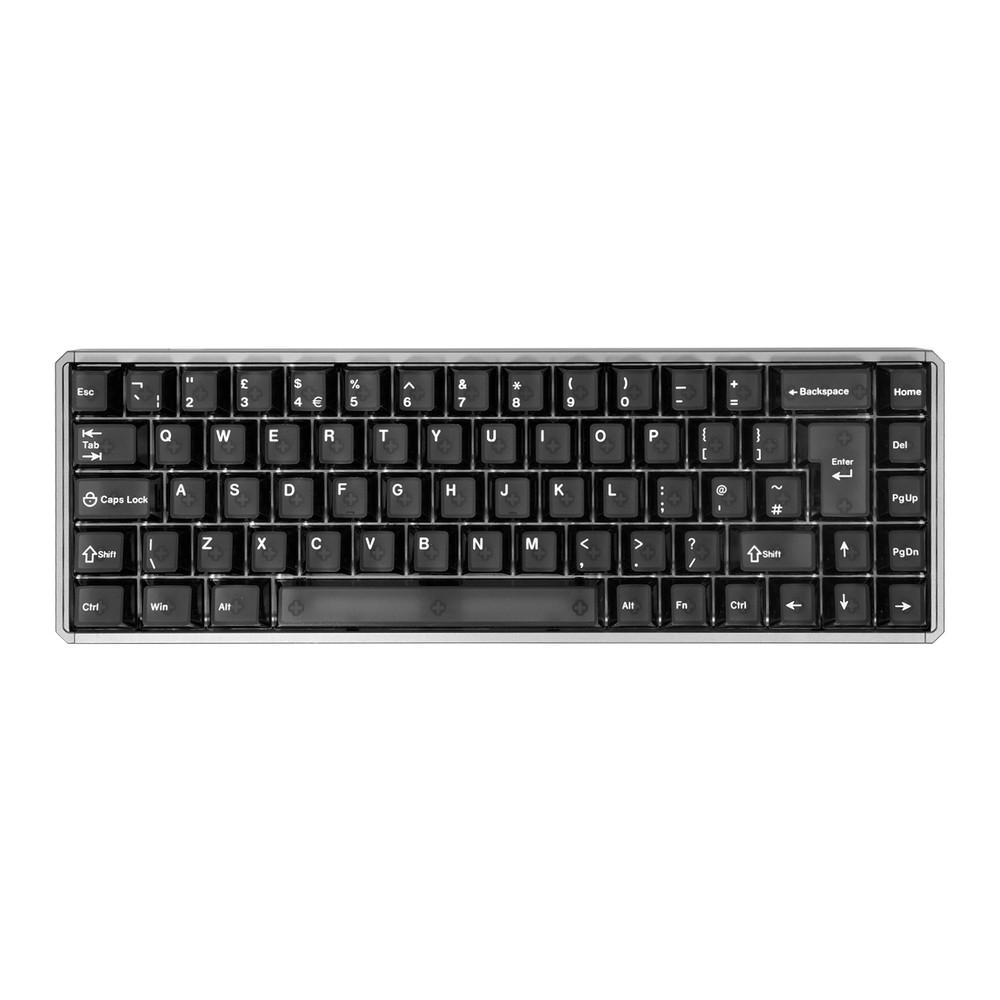
MOD68 HE ISO-UK
The British-layout pick: CNC aluminium case, magnetic switches with 0.1 to 3.3 mm actuation and rapid trigger, PBT double-shot keycaps. Magnetic switches only. €85.67 wired, €95.19 wireless.
See the MOD68 HE ISO-UK →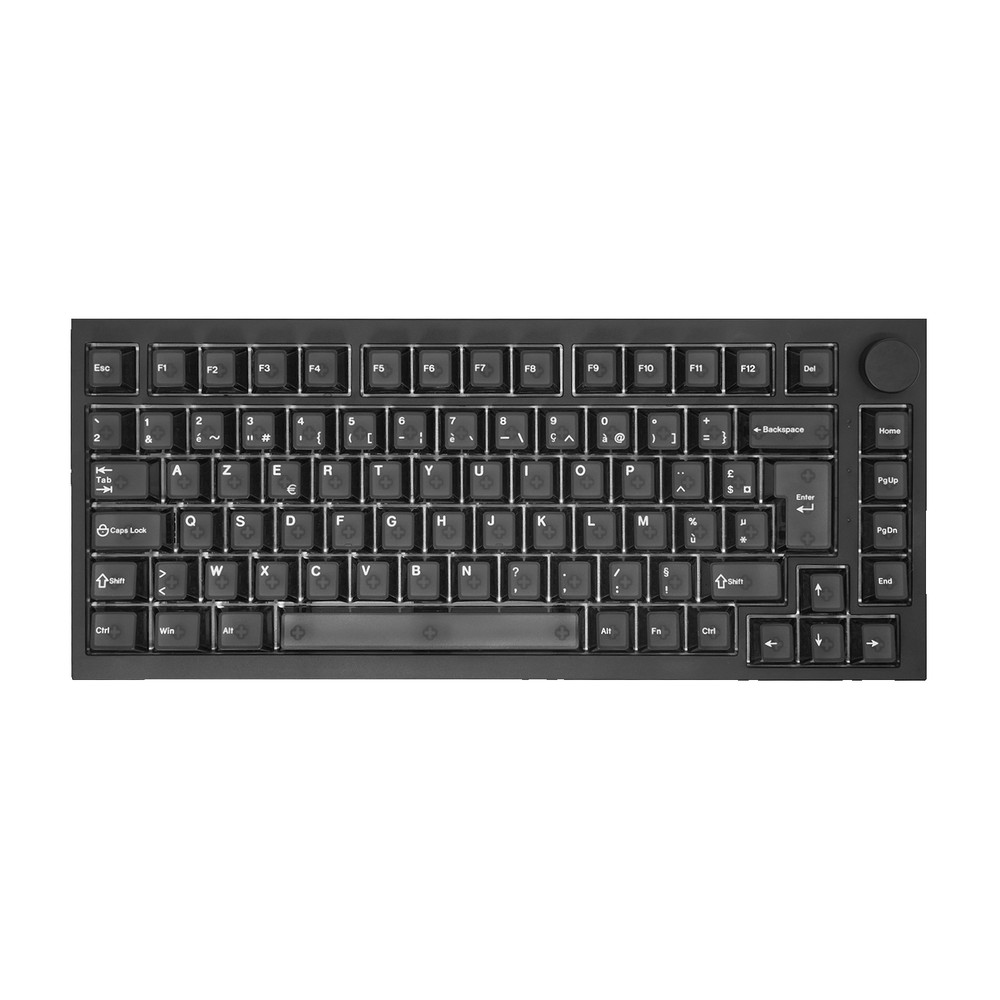
5075 V5 HE ISO-FR
AZERTY on a 75% magnetic board: 8K polling, 0.1 to 3.4 mm actuation, side-printed Cherry-profile PBT keycaps. €118.99 wired, €130.89 tri-mode.
See the 5075 V5 HE ISO-FR →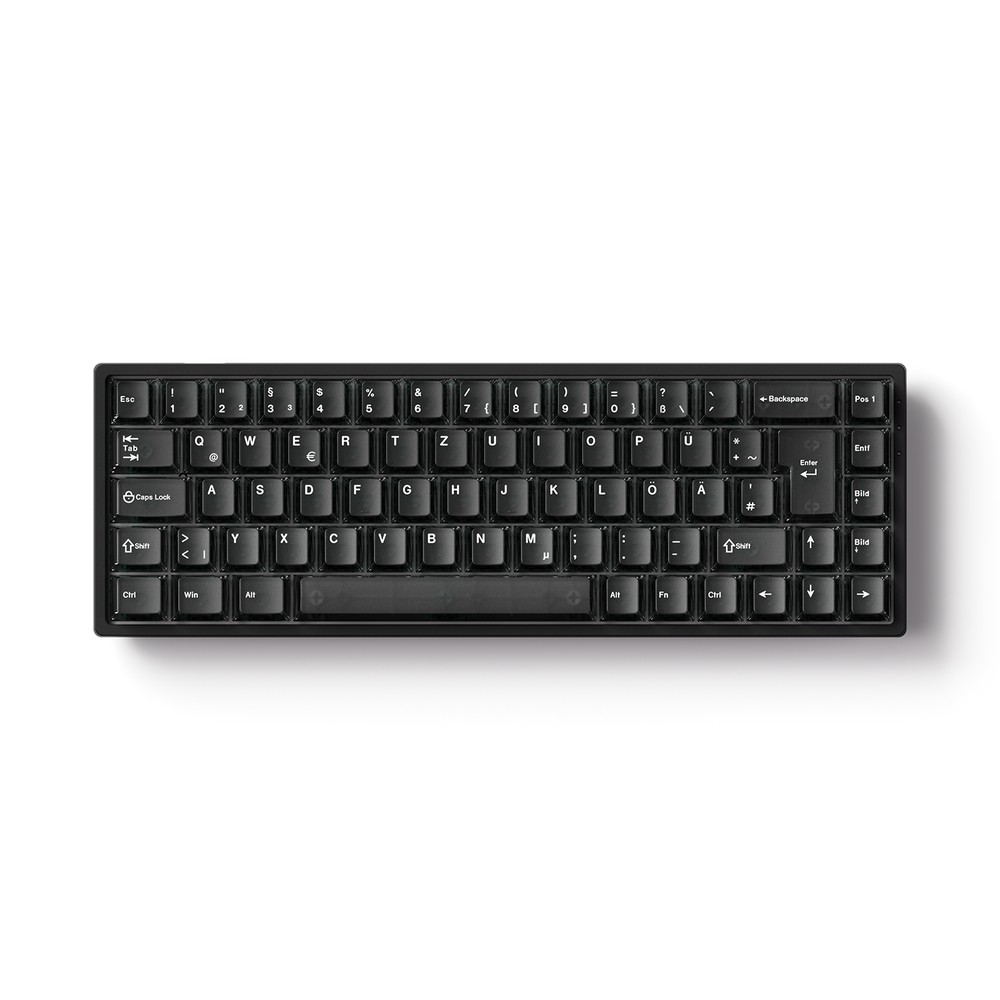
FUN68 ISO HE
The cheapest new magnetic ISO board on the store: MonsGeek's 65% ISO-DE with Akko AstroAim switches and cross-compatibility with major magnetic switches. €71.39.
See the FUN68 ISO HE →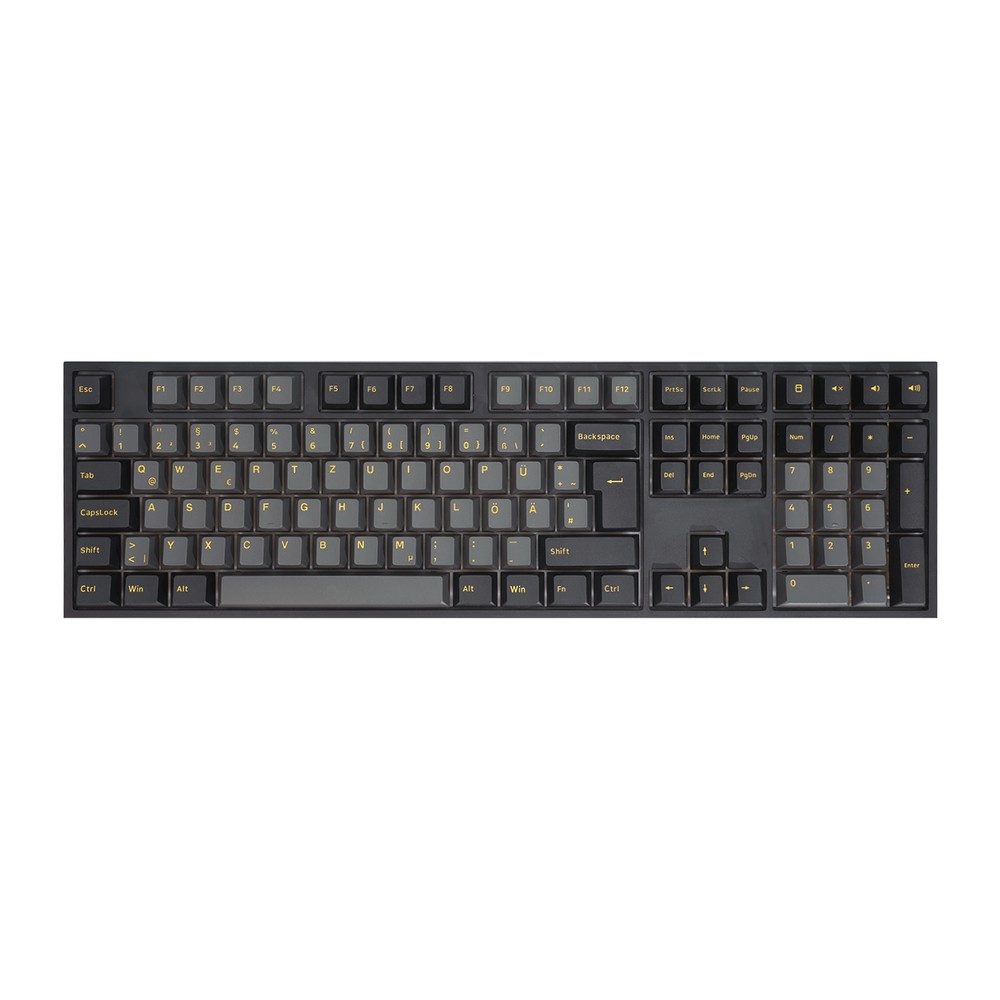
5108 V5 ISO
Full-size ISO-DE with the number pad: gasket mount, tri-mode connection, 8,000 mAh battery, PBT dye-sub MOA keycaps. The store tags it discontinued. €130.89.
See the 5108 V5 ISO →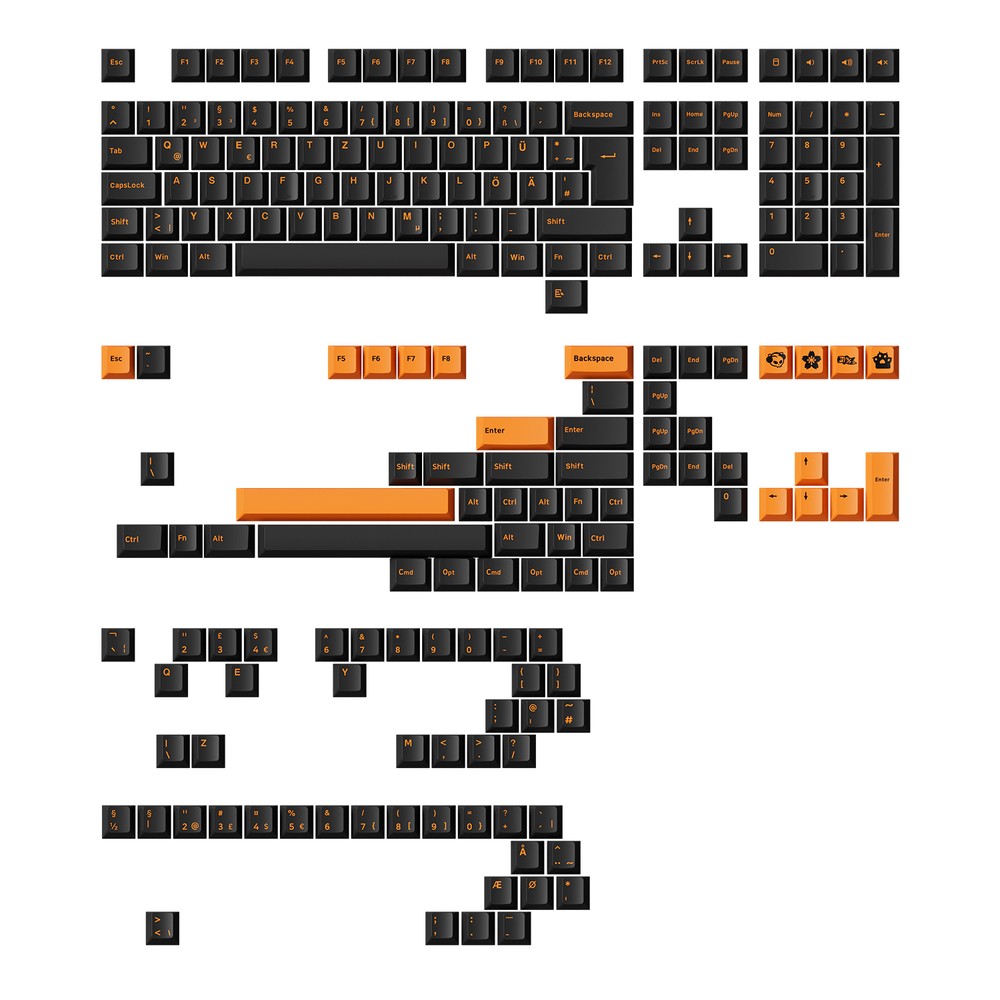
Orange on Black ISO Keycaps
210 Cherry-profile PBT double-shot keys covering ISO-DE, UK and Nordic in one set, with Mac modifiers included. Not for AZERTY. €47.59.
See the Orange on Black set →ISO and ANSI Questions
Are US keyboards ANSI or ISO?
US keyboards are ANSI, with the wide single-row Enter and long left Shift. Keyboards and laptops sold in the UK and most of continental Europe are ISO, so a laptop bought in London or Berlin will have the two-row Enter.
Are Logitech keyboards ANSI or ISO?
Logitech keyboards come in both, and the layout follows the regional model: a US Logitech board is ANSI, while UK and German versions are ISO. Logitech's own layout guide adds that it also supports PTB for Brazil and JIS for Japan.
Does a Mac care whether a keyboard is ISO or ANSI?
A Mac does care: macOS recognises three keyboard types, ANSI, ISO and JIS, and opens Keyboard Setup Assistant when it cannot identify a keyboard, according to Apple's Mac User Guide. Pick ISO for a UK or European board so macOS maps the extra key beside left Shift.
Can I use an ISO keyboard with a US layout?
An ISO keyboard works with a US layout once the operating system is set to US English. Letters and numbers type as usual, but the printed legends on several symbol keys stop matching what the keys produce, and the key shapes stay ISO.
These guides are written under a direct affiliate agreement with Akko. Links to akkogear.eu are affiliate links: if you buy through them, we earn a commission from Akko at no extra cost to you. Nothing in this hub is ranked by our shortlist formula, and prices are Akko's own listed euro prices on the date shown.