Winner

ELEGOO Saturn 4 Ultra 16K Resin Printer
9.0/10
400+ bought in past month
View on AmazonRead the full reviewHow we make money. We earn a commission when you buy through links on this site, at no extra cost to you. Those commissions come from affiliate programmes run by the brands and by third-party networks, not from you.
How that affects this list. Products from brands we have a commercial relationship with are listed first. Products we earn little or nothing from can still appear, lower down, when they belong in the comparison.
How the order is set. The top three slots are named picks — best overall, most popular, best value — and each states the measurement it won on. Every product after them is ordered by one fixed formula: the Amazon star rating and review count, applied identically. No brand can pay for a slot, a badge or a score.
We do not test products in a lab. Read the full method on How We Rank.
Winner
9.0/10
400+ bought in past month
View on AmazonRead the full reviewBest Affordable

8.6/10
50+ bought in past month
View on AmazonRead the full reviewPopular
8.3/10
100+ bought in past month
View on AmazonRead the full review| Product | Best for | Our score | Amazon | Ice per day | Footprint | Where to buy |
|---|---|---|---|---|---|---|
1 ELEGOO Saturn 4 Ultra 16K Resin PrinterWinner ELEGOO Saturn 4 Ultra 16K Resin PrinterWinner | Best overall | 9.0 | — | 24 x 17 x 15 inches | Check price | |
2 ELEGOO Saturn 3 12K Resin PrinterBest Affordable ELEGOO Saturn 3 12K Resin PrinterBest Affordable | Cheapest resin | 8.6 | — | 12.05 x 10.75 x 22.13 inches | Check price | |
3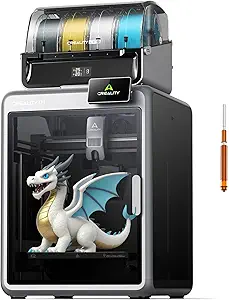 Creality K2 Combo Multicolor 3D PrinterPopular Creality K2 Combo Multicolor 3D PrinterPopular | Most reviewed | 8.3 | — | 21 x 25 x 20 inches | Check price | |
4 Anycubic Kobra X Multicolor 3D Printer Anycubic Kobra X Multicolor 3D Printer | Best multicolour | 8.8 | — | 23 x 13 x 22 inches | Check price |
Why trust this list
We do not rate these ourselves. Every claim on this page is tied to public Amazon rating and review-theme data, and carries the count it came from.
This is the number that should shape your expectations. WinnerReviews counted 122 mentions of reliability across the 3 printers here that draw them, and 48% were positive. A 3D printer is not an appliance you switch on and forget — it is a machine with a heated bed, moving axes and consumable parts, and roughly half of the people who raise the subject are describing something that went wrong. Budget time as well as money.
59 of 122 mentions, 3 of 4 printers
Adhesion is the lowest-scoring theme on this page: 9 of 33 mentions positive, 27%. On two of these listings Amazon marks it negative outright rather than mixed. What owners describe is a print lifting a corner off the plate an hour in and taking the rest of the job with it. It is the single most common reason a new owner gives up, and almost always a levelling or surface-prep problem rather than a broken machine.
9 of 33 mentions, 3 of 4 printers
WinnerReviews found 10 of 31 mentions of build quality and screen life positive, 32%. The pattern is consistent across both technologies: on a resin machine it is the LCD and the FEP film in the tank, on a filament machine the nozzle and the build plate. None of those are faults — they are consumables with a service life, and the printers that draw the most complaints are the ones whose owners did not know that before buying.
10 of 31 mentions, 3 of 4 printers
We went through every review theme Amazon publishes for these four machines — 674 counted comments — and put the number beside each claim we make from it. Two things hold across all four: value for money is where they deliver, 85% positive across 47 mentions, and print quality is what none of them has solved, at 80%. What separates them is everything below.
Positive 67%139 comments counted
Every theme Amazon counted
Overview
This is the one we would put in front of someone who wants detail and does not want a project. A ten-inch 16K screen is the sharpest on this page, the auto-levelling is the rare kind owners actually praise rather than tolerate, and every single person who mentioned setup called it easy — seventeen out of seventeen, which we have not seen on another listing in this category. Several describe getting a usable print on the first attempt, straight out of the box.
The problem is what happens later. Durability is the worst-scoring theme on this whole page, and the reports are specific: FEP film splitting in the resin tank, warped build plates, and an LCD that means dismantling the machine to replace. None of that is unusual for resin printing — the screen and the film are consumables — but the failures here come sooner than the price suggests they should. Buy it for what it prints, and budget for a spare screen.
| Brand | ELEGOO |
|---|---|
| Model | Saturn Series 3D Printer |
| Dimensions | 24 x 17 x 15 inches |
| Weight | 35.5 pounds |
| Filament / resin | ABS, Aluminum, Polycarbonate |
Positive 71%152 comments counted
Every theme Amazon counted
Overview
The cheapest way onto this page, and the resin detail is why it stays on it. Owners describe the quality as the reason they bought it rather than as a surprise, the build volume runs above what the price bracket usually offers, and setup is the sort you finish before finding the manual. If the Saturn 4 above is more machine than the budget allows, this is the same idea one generation back.
Two things to plan for. Prints lifting off the plate is the top complaint here, which is a levelling and surface-prep problem more than a machine problem, but it is the one that makes new owners give up. And the LCD is a wear item that owners on this model do hit — the 12K screen is cheaper to replace than the Saturn 4's, which is some consolation, but factor it in.
| Brand | ELEGOO |
|---|---|
| Model | SATURN 3 |
| Dimensions | 12.05 x 10.75 x 22.13 inches |
| Weight | 33 pounds |
| Filament / resin | ABS, Aluminum, Polycarbonate |
Positive 66%245 comments counted
Every theme Amazon counted
Overview
The most-reviewed printer on this page by a distance, and the verdict holds up under that many eyes. Multicolour through the CFS feeder, a rated 600 mm/s that owners say the machine actually uses, and it arrives assembled and calibrated — several describe a successful first print with no adjustment at all. If you want the option with the most people standing behind it, this is that option.
Adhesion is the one theme Amazon rates negative rather than mixed on this listing, and it is the same story as everywhere else in the category: a corner lifts, the print fails, the job is lost. Reliability splits owners almost evenly and build quality draws more complaints than praise. Our read is that this is a printer worth owning if you expect to maintain it, and a frustrating one if you expected an appliance.
| Brand | Creality |
|---|---|
| Model | K2 Combo 3D Printer |
| Dimensions | 21 x 25 x 20 inches |
| Weight | 55 pounds |
| Filament / resin | Aluminum, Metal |
Positive 77%138 comments counted
Every theme Amazon counted
Overview
If you want multicolour without the price of the machines that usually do it, this is where we would look. Native four-colour, expandable to nineteen with the ACE unit, and owners consistently describe going from box to first print inside half an hour. Not one person who mentioned the price thought it was too much — twelve out of twelve — which almost never happens, and it is the clearest signal in the data that this machine is priced below what it does.
Clogging is the thing to know about. It is the recurring failure in these reviews: filament jamming in the feed, sometimes after a good run of prints, sometimes on the second one. Reliability overall reads as a coin flip, and adhesion needs watching until you have the first layer dialled in. This is a capable printer for the money and it is not a machine you can ignore.
| Brand | ANYCUBIC |
|---|---|
| Dimensions | 23 x 13 x 22 inches |
| Weight | 20.9 pounds |
| Filament / resin | Metal |
Start here, because it reframes everything below it. Across the printers on this page, 59 of 122 mentions of reliability were positive — 48%. That is not a comment on these four machines. It is what the category looks like. A printer that runs for a year untouched is the exception in the reviews, not the rule, and any page that tells you otherwise is not reading the same comments we are.
| Brand | Share of mentions that were positive | Sample |
|---|---|---|
| ELEGOO Saturn 4 | 45% | 13 of 29 |
| Creality K2 | 48% | 29 of 61 |
| Anycubic Kobra X | 53% | 17 of 32 |
What splits a good experience from a bad one is almost never the badge on the front. It is whether the owner expected to maintain the thing. The people writing five-star reviews talk about re-levelling, swapping a nozzle, cleaning a screen. The people writing one-star reviews describe the same events as faults. Same machine, different expectation.
So the question to ask before you buy is not which printer never breaks. It is which one you can get parts for, and whether the support answers. On that measure the two established brands here — ELEGOO and Creality — have a longer track record of spares being available at all, which matters more after month six than any spec on the box.
The cheapest insurance comes up in every beginner thread on r/3Dprinting: wash the build plate with dish soap and water every few prints — fingerprint oil is behind a large share of the adhesion failures that get blamed on the printer — and learn what model orientation and supports do before judging a machine on a badly oriented file. Two habits, most of the frustration gone.
Two of the printers here are resin machines and the rest are filament. They are not competing products. Resin gives detail a filament nozzle cannot reach, which is why miniature painters use it — but it means liquid photopolymer, gloves, isopropyl alcohol for washing, a UV station for curing, and ventilation you actually mean.
Filament is the one to buy if you want to make brackets, boxes and replacement parts and then walk away. Resin is the one to buy if you want detail and accept a wet, smelly workflow with disposal rules. Decide which of those two people you are before comparing any specs.
Several machines here advertise multi-colour printing through a filament changer. What the listings do not lead with is the purge: at every colour change the printer flushes the old filament out of the nozzle, and that plastic goes in the bin.
On a model with frequent colour changes the waste can rival the weight of the part itself. It is still the only practical route to multi-colour at this price, but budget filament accordingly and expect a growing pile of purge blocks.
If you have researched this category you will notice Bambu Lab is missing, and it is currently the brand most often recommended for exactly this use case.
The reason is the one stated in our disclosure: we build these lists from brands we have an affiliate relationship with, and we do not have one with Bambu Lab. That does not make it a worse machine, and if it is the right printer for you, buy it. We would rather tell you that than pretend a list built from our commercial relationships is a survey of the whole market.
Running costs are modest but not zero, and they are where the durability complaints on this page come from. Nozzles wear, PTFE tubing degrades with heat, belts stretch and build plates lose their coating.
None of that is expensive individually — most are a few dollars — but treating them as defects rather than consumables is what turns an ordinary maintenance job into a one-star review. Buy a spare nozzle set with the machine.